Monday, 30 April 2012

Health + Safety working practices

1)      Basic H +S steps when using a computer
2)      H +S Steps when connecting peripherals

·         Chair level - Back pain
·         Lighting – Strain eyes
·         Prevention of RSI
·         Wires – Too many plugs
·         Take - Regular Breaks
·         Bags – Under desks (Tripping hazards)
·         Get Images from Google.

Basic H + S steps using a computer –

Understanding the law - make sure someone in your organisation has a health and safety brief covering all areas, not just computers.

Being aware of the health risks - the government officially recognises some of the risks although there are some grey areas you'll need to make up your own mind about.

Assessing the risks - using procedures set out in the law - be systematic and get help if you need it. Get a health and safety audit done by a competent organisation if necessary.

Taking steps to minimise the risks - this may only involve taking simple measures.

Training all users to recognise the risks if people aren't aware of the dangers they can't take adequate precautions to protect their health.

Taking users views seriously - if users feel there is something wrong there often is.

H + S Steps when connecting peripherals –

Be careful whenever they connect a printer.

Take the right steps on how to setup a speaker so that it plays to maximum capacity.

Understand how to setup a scanner with a computer with the simple steps they give you with the scanner.

Be careful when trying to install a digital camera on to a computer for the first time.

Understand how to install a microphone as a device onto your computer by using the helpful information they give you whenever you first brought it.

Monday, 26 March 2012

Security Risks

 I have been asked to evaluate a network for security threats and provide solutions. The site has 50 users on the network. All users must have an internet connection and be provided with passwords.


  • 50 users
  • No log on to the network
  • Internet (unrestricted access)
  • Staff are ‘allowed’ to install and remove software
  • Data is backed up once a month
  • Data tapes are kept secure in a locked plastic box on top of the server
  • The company keeps records in a database on customers
This information includes:

  • Email is available to all.
  • IP address log is not kept of sites visited.
  • No firewall is in place.
  • No restrictions on internet access.
  • Downloads are not monitored
  • Entrance doors are not protected by keypad etc.
50 Users-
It would be hard to get onto the network. If there was no log onto the network. Everyone one trying to get on same network at same time.

No Log on to network -
This is not good. If cant get onto internet sadly you cant really do nothing about because the internet need to be working properly to even connect to internet. So if can connect to it then there nothing really you can do. 

Internet (unRestricted Access) -
If go on the internet and you are not protected by your internet browser like "Internet Explorer" or "Google Chrome" then you have to get security software to protect you from the internet like avast and all these security program's to pick from.

Staff are ‘allowed’ to install and remove software -
If staff are allowed to install or either remove software. This sort of a good and a sort of a bad thing at same time. Because you do sort of trust your staff but maybe not in the way to install expensive software and uninstall it.


Data is backed up once a month -

This is not good at all. Data should be backend every weekend. The amount of data that need to be backed up as well if quite large so that why it need to be backed up every week. So that it doesnt get to big and pile that the servers cant hold it anymore. So it need to backup every weekend really. A month is far to long to wait. 

No firewall is in place -
This is quite serious. If you go on without a firewall a virus can spread and infect or get more virus or pop up that wont go away that you normally would get. Then if you have a firewall that would stop you from all of that. If you dont have a firewall enabled that might mean you will get a lot of virus or malware infected on to your computer without you even knowing.

No restrictions on internet access -
This is also not a good idea. You could go on any site and not even know if is bad or not. That why enable restricted internet access so that your internet browser will only go onto website that are safe and not ones that will give you virus and malware content.


The company keeps records in a database on customers -
Keeping the records i think is another smart idea incase somebody leaves the company. But only bad thing is that everybody has access to database so it aint that private.


Email is available to all -
I dont think it is safe just for all to see the email. I think you might maybe put it in a safe secure document that only have the password to access it. So just not anybody can access it.


IP address log is not kept of sites visited -
Not keeping the IP address log is sort of a good thing whenever you visit a site that maybe you dont want people to see.

Data tapes are kept secure in a locked plastic box on top of the server -
That is a good idea. Data tapes so be secured at all times they are important for whenever need them. So that why keep them away somewhere so cant get broken or stolen.

Downloads are not monitored -
If you dont have downloads monitored you dont know what other add-ons you could be downloading with it without you even knowing but if you do have downloads monitored then you have a better and a safer chance of not downloading any add-ons or any other dangerous content.

Tuesday, 10 January 2012

Assignment 3 Task 2

I have recevied a phone call from your friends asking you to look at the computer as they have recently got into computer gaming and are experiencing slow response times and poor video and i have a couple of gaming products i would like to show my friend that likes gaming.


I found this computer that is a gaming computer it is very fast and certainly not slow. It is called Poseidon Watercooled Gaming PC it has a Hard Drive and a Seagate Barracuda 1TB Hard Disk. It is the perfect gaming pc for gaming and fast response and also have great video quality plus is also has a cooling system so that the pc doesn't overheat if being used to much at one time.


Intel Core i7 2600K 3.4GHz Processor
Nvidia GTX 580 1536MB PCI Express Graphics Card
Seagate 1TB SATAII 7200rpm 16MB Cache Hard Drive
Windows 7 ready


Price: £1,959.99


I Picked this computer because it is very fast and does not have a slow video response. It also is very good aswell because it has a watercooled system which means it wont overheat your system and is also very good for playing games on and very fast aswell for games online and offline for it.

Monday, 5 December 2011

Assignment 3

A friend has approached you for advice on purchasing a PC to work from home. You have asked a series of questions and obtained these answers.

I run database reports and use spreadsheets.


The first piece of software i would suggest to my friend for to run database reports and spreadsheets is Microsoft Excel 2010. It will make better decisions quickly with easy-to-analyze spreadsheets. Microsoft Excel is the also standard for business analysis.

Price: £119.99.


When you buy off Microsoft official website they will send you the package with secure box with the disk and serial code to download and install on to your pc.


My children may want to research on the internet and I will need to access work email from home.

The second piece of software i would suggest to you is. Microsoft Outlook Express 2010.  
Stay connected to your world with our most up-to-date e-mail and calendar tools. Stay more connected than ever before with Microsoft Outlook 2010.


Price: £119.99


When you buy off Microsoft official website they will send you the package with secure box with the disk and serial code to download and install on to your pc.


I need to transfer some large video files (at least 100Mb) which I need to store and run.

The third piece of software i would suggest to you is an External hard drive. It is great because some external hard drive can be either fitted into you pc or some can simply be connected to your computer via USB Port it that simple and give's you a whole lot more memory. If you want a high memory external hard drive (100mb Or 250mb or 500mb or more) there now even cheaper. There is even portable external hard drives.


Price: £69.99
Seagate 500GB External USB 3.0 Portable Hard Drive


I enjoy playing computer games.


The fourth piece i will show is a joystick. A joystick is very good for anybody who likes gaming and is very easy to use. Some Joystick's are cheaper than other's and some others are more higher priced more and likely the higher priced Joystick's are going to be PC and Console compatible and then the cheaper priced Joystick's are just going to be either PC compatible or Console only compatible. That why the higher priced Joystick's are better but are a good bit more than normal cheap Joystick's.


Higher Priced Joystick
Logitech Freedom 2.4 PC Joystick Wireless USB
Price: £70.10
Lower Priced Joystick
Logitech 942-000005 Extreme 3D Pro Joystick for PC
Price: £34.99


I take lots of pictures with a digital camera and I would like to transfer these to the computer and print them.


The fifth piece i will show is a all-in-one printer. Digital Camera are great when you have a printer that can print it out or even save it to your hard drive for later use. Now the all-in-one printer is great but they is other printers that are not as good and are also cheaper but if you want do what every want and have no promblems the all-in-one printer is the probably the best one to buy.


HP ENVY 114 e-All-in-One AirPrint Printer
Price: £249.95


Cost is not a big problem at this time.

If you want to go big and spend a lot of money then this is what you want to buy. An Apple Mac Pro starting at hefty £4,083.00 and if you the money to max it out with all the accessories then you will have a bill of £16,694.94. It certainly is very good looking but wondering is it worth all that money when it is only a desktop. But with its impressive specifications it comes with Two 2.93GHz 6-Core Intel Xeon “Westmere” (12 cores), 64 GB (8 x 8 GB), Mac Pro RAID Card, 512GB solid-state drive 4x, ATI Radeon HD 5870 1GB. It certainly sound good anyway.


Normal Apple Mac Pro
Price: £4,083.00

Apple Mac Pro with all accessories
Price:£16,694.94

Monday, 14 November 2011

Assignment 2

To modify a computer for someone who is visually impaired, you have to do the following, make all Icons on the computer screen bigger, Minimise the ribbon so that it will only appear when the user clicks on the menu name, Add Font Style to the Quick access tool bar, The screen should be displayed as a blue background and white text and Change the default display to a higher resolution. I would also set up two different applications in microsoft office and there called magnifier and narrattor, the magnafier is for magnifing into work and the narrator is the computer reading out loud.

I clicked on view by right clicking and changing from medium icons to large icons.


This is the desktop without auto-arranged.

This is the desktop now auto-arranged.

This is an example of a word document and the arrow in the picture is pointing to the quick access toolbar icon.


Customize the quick access toolbar menu.


This is a zoom up version off more icons beside the save icon.


This is Microsoft word with the ribbon on so that can see all the features within microsoft word.

This is Microsoft word with the ribbon off. It just the screen with no feature's either top or bottom.


This is the program Narrator that I ‘am hoving the mouse over.


This is the voice setting in narrator.

The writing is now changed colour.

How microsoft helps visually impaired

Imagine that you were suddenly deprived of all visual data and that the information. Blind or visually impaired people worldwide and the millions more who are otherwise print disabled, unable to process text because of learning, developmental, or physical disabilities, that is often what it feels like when having to access the same information the rest of us take for granted in books or on screen. I think Microsoft office is good for helping people who are Visually impaired and think that there products are also very good for Visually impaired people or anybody else who has learning or physical disabilities because it easy to use.


Friday, 14 October 2011

Software

Systems software -
System software is computer software designed to operate the computer hardware by running application software. Systems software are the things inside your computer that you cannot touch or see. This would be programs such as your operating system and word processing software.


Applications software -
Application software, also known as an application is a computer software designed to perform specific tasks. Examples include software office suites,media players graphics. E.G - Gimp,Microsoft they are both graphic. The Apps may be bundled with the computer and its system software, or may be published separately.


Software utilities -
Utility software is a kind of system software designed to help analyze, configure,maintain a computer. A single piece of utility software is usually called a utility tool. The Utility software application, which allows users to do things like creating text documents, and other features when using the an Utility software.

Tuesday, 11 October 2011

Devices for Network Connection

3G/4G -
3G generation mobile communications is a generation of standards for mobile phones and mobile communication services can be used over the whole world with international mobile communications.


4G -
Is the fourth generation. It is a successor to the 3G and 2G. A 4G system is expected to provide a secure IP based mobile broadband laptop computer wireless modems, smart phones, and other mobile devices.


Wireless/Bluetooth -
Bluetooth is a open wireless technology standard for exchanging data over short distances.

Wireless -
Wireless is the transfer of information between two or more points that are physically not connected. Distances can be short, as a few meters or long ranging from thousands to millions of kilometres.


Network Interface Cards (NIC) -
A network interface card is a computer hardware component that connects a computer to a computer network. Most Network interface cards are designed for a particular type of network, media, although some can serve multiple networks.

Different Types of Computer Systems

PC -
A personal computer (PC) is any general-purpose computer. Size, capabilities, it useful for individuals,expensive mainframe systems to be used by many people, usually at the same time. Large data processing systems.


Laptop -
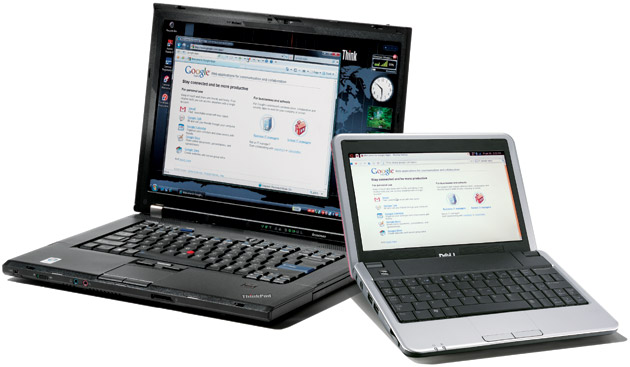
A laptop, is a portable computer most of the typical components of a desktop computer, are included in a laptop including a display, a keyboard, a pointing device and speakers. A laptop is powered by mains electricity via an AC adapter, and can be used away from an outlet using a rechargeable battery.
Netbook -
Netbooks are a category of small, lightweight, and inexpensive laptop computers.Netbooks are smaller and more portable - the screen size ranges from 7 inches to 10 inches - they tend to use lower power such as the Intel Atom in order to maximize battery life. They don't have a cd/dvd player they are intended for light computer work such as browsing the web, cloud computing checking email,word processing - they aren't that good at doing heavy video editing or photographic work.
PDA (Personal digital assistant) -
A personal digital assistant (PDA), also known as a personal data assistant, is a mobile device that functions as a personal information manager. Current PDAs often have the ability to connect to the Internet. A PDA has an electronic visual display, enabling it to include a web browser, but some newer models also have audio, enabling them to be used as mobile phones or portable media players. Many PDAs can access the Internet, or via Wi-Fi or Wireless Networks. Also Many PDAs use touchscreen technology.
Mobile phone -
A mobile phone also known as a cell phone allows phone calls to another mobile phone or text messages wherever they are. Early mobile phones were usually bulky they provided limited service because only a few networks were available. Modern mobile phones make use of the network, where networks are re-used repeatedly.


Game console -
A video game console is an interactive entertainment computer system that produces a video display which can be used with a display device (a television, monitor, etc.)
To display the video game.
Tablet -
A tablet personal computer or tablet PC is a tablet-sized computer it also has key features of a full-size personal computer has. A tablet PC is essentially a small laptop computer, equipped with a rotatable touchscreen aan additional input device, and also has a standard PC operating system like Windows or Linux.
Server -
A server is a computer program running to serve the requests of other programs,the server performs .The clients either run on the same computer or connect through the network. In most common use, server is a physical computer hardware system dedicated to running one or more such services to serve the needs of users of the other computers on the network.
Embedded devices -

A embedded device is a electronic computer that has input, output and process. Embedded devices are small programmable chips that can be programmed to execute certain orders.